
CookBook - The Recipe Manager1.60860 - Google Play
You'll be able to see results in few seconds.
Publisher Description

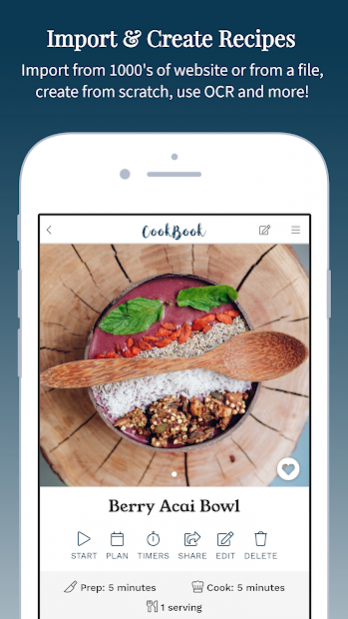
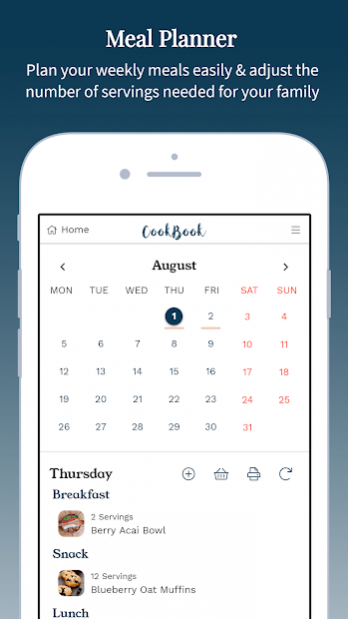

Get recipe organised! Save recipes from your favourite websites and magazines. Access recipes from your mobile, tablet and desktop devices. Always available offline. Plan meals and create shopping lists. Cook with intuitive displays, timers and much, much more! CookBook is the best Kitchen tool around.
Key Features
• Import – save recipes from websites, enter from books or use your culinary expertise and update on the fly with new ingredients, steps and pictures as you cook.
• Offline recipes – All recipe data and images are saved locally for offline usage.
• Convert - Seamlessly convert ingredients from your entered and imported recipes to your preferred US, Imperial and Metric measures.
• Meal Plan & Shopping – plan your weekly meals with the required servings and create interactive shopping lists from your plan to take shopping or to export and use later.
• Cooking Mode – Intuitive cooking with text reading, ingredient toggles and multiple timers!
• Cloud Storage (FREE!) - Automatically synchronises and stores your recipe information with our CookBook cloud to enable access from the mobile applications and our free website.
• Search – find by ingredient, tag your meals with categories or make them a favourite to quickly find and access the meal you are looking for.
• Share – send recipes via the CookBook format, PDF or email.
• Timers – Automatic detection of timers from text
• Scan (OCR) – save recipes directly from your camera, straight into CookBook
• Multi-platform – Access recipe data on our website (FREE!) or from other popular mobile platforms.
Extra Features
• Select between 2 beautiful sleek CookBook designs.
• Quickly scale recipe ingredients to your desired number of servings.
• Search for recipes using the leftovers in your fridge
• Create recipe timers automatically from detected instructions or enter them manually to alert you when you are needed in the kitchen.
• Run concurrent timers across the recipes you are currently cooking to multitask.
• Use our default or create new categories to help you keep your recipes organised.
• Add an overall photo and individual photos to each recipe step to create easy visual directions.
• Recipes available offline to allow you access when you have no internet connection.
• ‘Surprise me’ feature for those times when you just can’t decide what to eat!
• All this and more, accessible on our website or through our dedicated mobile applications, synchronised across your devices, on or offline, with one account and no annoying adverts.
Our developers are continually working to perfect CookBook and therefore we want to hear from you, what you think and what you’d like CookBook to do next! Use the ‘Contact Us’ page to get in touch and one of our team will get straight back to you.
CookBook
Your recipes, your kitchen, your CookBook.
About CookBook - The Recipe Manager
The company that develops CookBook - The Recipe Manager is Cookbook Ltd. The latest version released by its developer is 1.60860.
To install CookBook - The Recipe Manager on your Android device, just click the green Continue To App button above to start the installation process. The app is listed on our website since 2019-11-24 and was downloaded 0 times. We have already checked if the download link is safe, however for your own protection we recommend that you scan the downloaded app with your antivirus. Your antivirus may detect the CookBook - The Recipe Manager as malware if the download link to com.cookbook.cb is broken.
How to install CookBook - The Recipe Manager on your Android device:
- Click on the Continue To App button on our website. This will redirect you to Google Play.
- Once the CookBook - The Recipe Manager is shown in the Google Play listing of your Android device, you can start its download and installation. Tap on the Install button located below the search bar and to the right of the app icon.
- A pop-up window with the permissions required by CookBook - The Recipe Manager will be shown. Click on Accept to continue the process.
- CookBook - The Recipe Manager will be downloaded onto your device, displaying a progress. Once the download completes, the installation will start and you'll get a notification after the installation is finished.
Program Details
System requirements
Download information
Pricing
Version History
version 1.60860
posted on 2019-11-24
- Minor bug fixes (fix OCR duplication, language Unicode characters & speed update)
version 1.60850
posted on 2019-11-04
- Minor bug fixes (security update, searching & conversions)
version 1.60835
posted on 2019-09-15
- Various bug fixes (searching)
- New colour scheme & branding!
- Enhanced edit screens
- New recipe search interface!
- Improved speed and recipe display
- You can now enter custom ingredients or text into the meal planner directly!
- Generate a PDF of your meal plan
- Save recipes to HTML and YAML format for sharing with users on other applications
- Bulk export / backup recipes
version 1.60825
posted on 2019-09-10
- Various bug fixes (conversion, editing & step photos)
- New colour scheme & branding!
- Enhanced edit screens
- New recipe search interface!
- Improved speed and recipe display
- You can now enter custom ingredients or text into the meal planner directly!
- Generate a PDF of your meal plan
- Save recipes to HTML and YAML format for sharing with users on other applications
- Bulk export / backup recipes
version 1.60795
posted on 2019-08-14
- Various bug fixes (scrolling, conversion, notes, titles)
- New colour scheme & branding!
- Enhanced edit screens
- New recipe search interface!
- Improved speed and recipe display
- You can now enter custom ingredients or text into the meal planner directly!
- Generate a PDF of your meal plan
- Save recipes to HTML and YAML format for sharing with users on other applications
- Bulk export / backup recipes
version 1.60790
posted on 2019-08-12
- Various bug fixes (conversion, notes, titles)
- New colour scheme & branding!
- Enhanced edit screens
- New recipe search interface!
- Improved speed and recipe display
- You can now enter custom ingredients or text into the meal planner directly!
- Generate a PDF of your meal plan
- Save recipes to HTML and YAML format for sharing with users on other applications
- Bulk export / backup recipes
version 1.60750
posted on 2019-06-26
- New recipe search interface!
- Improved speed and recipe display
- Various bug fixes (conversion, detection, cups)
- You can now share from the browser straight to CookBook!
- Recipe scanning (OCR) is now free!!
- You can now enter custom ingredients or text into the meal planner directly!
- Bulk export / backup recipes
- Recipe scanning updates allowing you to scan for title, descriptions, notes, ingredients, steps and much more!
- Enhanced memory usage and battery performance
version 1.60280
posted on 2018-03-23
- Bug fixes; Scan credits & links
- Speed enhancements
- Allow picture or detail view in recipe list screens (available under 'Settings')
- Detection of URLs copied to clipboard for import
- Allow addition of non-measured ingredients
- Improved recipe ingredient entry - enter ingredients in a single block
- Improved shopping lists - offline, save and view related recipes
- Improved speed and searching of large recipe collections
- Import support for additional file types
Disclaimer
Official Google Play Link
We do not host CookBook - The Recipe Manager on our servers. We did not scan it for viruses, adware, spyware or other type of malware. This app is hosted by Google and passed their terms and conditions to be listed there. We recommend caution when installing it.
The Google Play link for CookBook - The Recipe Manager is provided to you by apps112.com without any warranties, representations or guarantees of any kind, so access it at your own risk.
If you have questions regarding this particular app contact the publisher directly. For questions about the functionalities of apps112.com contact us.
